


Do you want to import Excel contacts to Outlook 365? If so, you came to the right page. Here you will find methods with which you can transfer without losing data and with attributes. In this blog, we will give you the best solutions to do it. So then read the post and do this task accordingly.
We all understand that there is no direct way. Therefore, we have to first convert Excel contacts to an Outlook 365 compatible format. Therefore, we will discuss the complete process in detail. So you can easily transfer Excel files to Outlook 365.
Hello, is there any way to export multiple Excel XLS files to Outlook supported PST files at the same time. I don’t know how to do it, but this work is very important. So help me find a solution to transfer contacts from Excel batch transfer to Outlook PST. Thank you support team.”
This customer request will be resolved shortly. Do you have a similar problem that requires a similar solution? If so, your request will be fulfilled immediately. We bring you the best automated software to get the job done. So get ready to know the solution.
Why Need to Import Excel Contacts to Outlook 365?
Best of all, Outlook 365 includes all the powerful features businesses need.
- Outlook 365 is the only email client that offers spam protection for all spam.
- So, these were some of the Outlook 365 features that users need to accomplish the task.
Manual Way to Transfer Contacts from Excel to Outlook 365?
Excel contacts can be imported into Outlook 365 using the Outlook Import/Export feature. This feature allows users to transfer contacts from other sources, such as Excel spreadsheets, into Outlook 365. This process can be done in a few simple steps and can save time and effort when trying to manage contacts in Outlook.
To import Excel contacts into Outlook 365, follow these steps:
- Open Outlook 365 and select “Contacts” from the navigation pane
- Choose the “File” button and then choose “Open & Export”
- Select “Import/Export”
- Press the Import from another program or file and Next, select the Next
- Pick Comma Separated Values (Windows) and then Click on the Next
- Browse to the Excel file that contains the contacts you wish to import
- choose the Do not import duplicate items and After that, hit on the Next
- Click the folder you wish to move the contacts into and then choose Next option
- Choose the destination folder for your contacts file and pick the Finish.
And that’s it! Your contacts should now be imported into Outlook 365. If you need to, you can now go in and edit the contacts to make sure they’re all up to date. Now Your contacts have been imported.
Drawback of Manual solution
- Potential Data Loss: When importing contacts from Excel to Outlook, there is a risk of data integrity issues that can result in data loss or corruption.
- Privacy Issues: When importing contacts from Excel to Outlook, it may expose private information that could be used maliciously.
- Formatting Problem: Excel spreadsheets are not designed to be compatible with Outlook, so formatting issues can arise when trying to import.
- Time-Consuming Process: Manually importing contacts from Excel to Outlook can be a time-consuming process.
- Duplicate Contacts: If you have duplicate contacts in your Excel spreadsheet, importing to Outlook could lead to duplicate contacts in your Outlook contacts list.
When switching from Excel to Outlook 365, the first step is to import your contacts from your Excel spreadsheet into Outlook 365. This guide will walk you through importing contacts from an Excel file into Outlook 365.
Automatic Solution to Import Excel Contacts to Outlook 365?
Excel Contacts Converter Software is the most reliable, secure and complete tool. This app is specially designed for users who need to import Outlook PST format Excel files without losing information. This application will also be useful to users with non-technical backgrounds. This application convert Excel to VCF, HTML, TXT, MBOX and other formats. One of the best things about this program is its easy to understand interface. You can easily use this program without any professional help.
Furthermore, this application is 100% safe and does not involve any risk. You can easily transfer contacts from Excel to PST file with just a few clicks. This application supports all versions of Microsoft Windows. Whether you have the latest version of Microsoft Windows10, Windows 11, this software can be downloaded under any Windows version and can easily complete your task.
Working Steps to Import Excel Contacts to Outlook PST Format
Tips: This app comes with a free trial version, which you can download and try. Therefore, it is recommended that you start with the tests. Before investing, you can test the app’s functionality and features through the demo version. Moreover, it allows you to few convert Excel contacts to PST format.
- First, download the software on your Windows machine and run it
- After that, go to the Browse tab and select the Excel file


- After that, the Excel spreadsheet file scanning process is done, you can “preview” the added CSV contact file in the Excel preview section


- Choose the PST radio Option from the export options

- Under Apply Settings, select the following settings


- Click the Change button to provide a destination path to save the generated file


- If you want to allow blank email addresses in the directory, select Allow blank email addresses to import


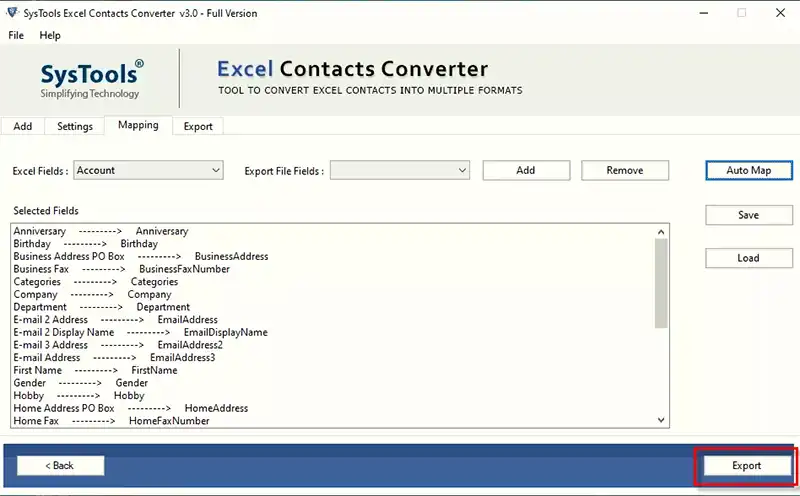
- When the mapping process is complete, select the Export option to start the conversion process

- After the export process is complete, the following message will appear. click yes

What Else Can the Software Do?
- This utility allows users to transfer multiple Excel contacts to the PST format without any problem.
- You can also convert selected Excel contacts as needed.
- The program allows users to select the destination where they should save their results.
- It successfully supports all latest and older versions of Windows operating systems.
- This tool can import Excel contacts to vCard 4.0, 3.0 and 2.1.
- Moreover, this application provides a detailed preview of Excel contacts in business.
- This tool has a free demo version that you can use to test the full functionality without any investment.
- This application does not require the installation of an external tool to import Excel contacts file PST.
- With this tool, you can convert an unlimited number of Excel contacts without losing any information.
- Using this app, users can specify where they want to save the output. This feature is useful for easy access and management of output.
- The suggested app has been thoroughly tested and is completely risk-free.
- These are just some of the features. Download the app for more great features.
Ending Note
Above we covered the topic of how to import Excel contacts to Outlook 365 account. Contacts can be easily transferred from Excel to Outlook with all attributes using the recommended software. Furthermore, the application ensures that it provides accurate and secure results. So, if you need to save Yahoo mail to Outlook, use recommended apps. This solution helps a lot.
You May Also Read: What are the top Threats and Practices of Data Security?